
✓ Trading Journal System

Free MT4 & MT5 Trading Journal With Automatic Trade Tracking

Stop logging trades manually. Connect your MetaTrader account, and every closed trade is captured automatically with chart screenshots, 10 professional performance metrics, equity curve, and detailed breakdowns by symbol, day, and hour. Works with any MT4 or MT5 broker · No credit card required · Setup in 5 minutes

Track TradesAuto-sync every position
Rule ReviewsReview discipline & mistakes
Performance EdgeDiscover your trading edge
Behavior InsightsAnalyze emotional patterns
Setup AnalysisTrack winning setups
Execution ClarityImprove entry & exit timing
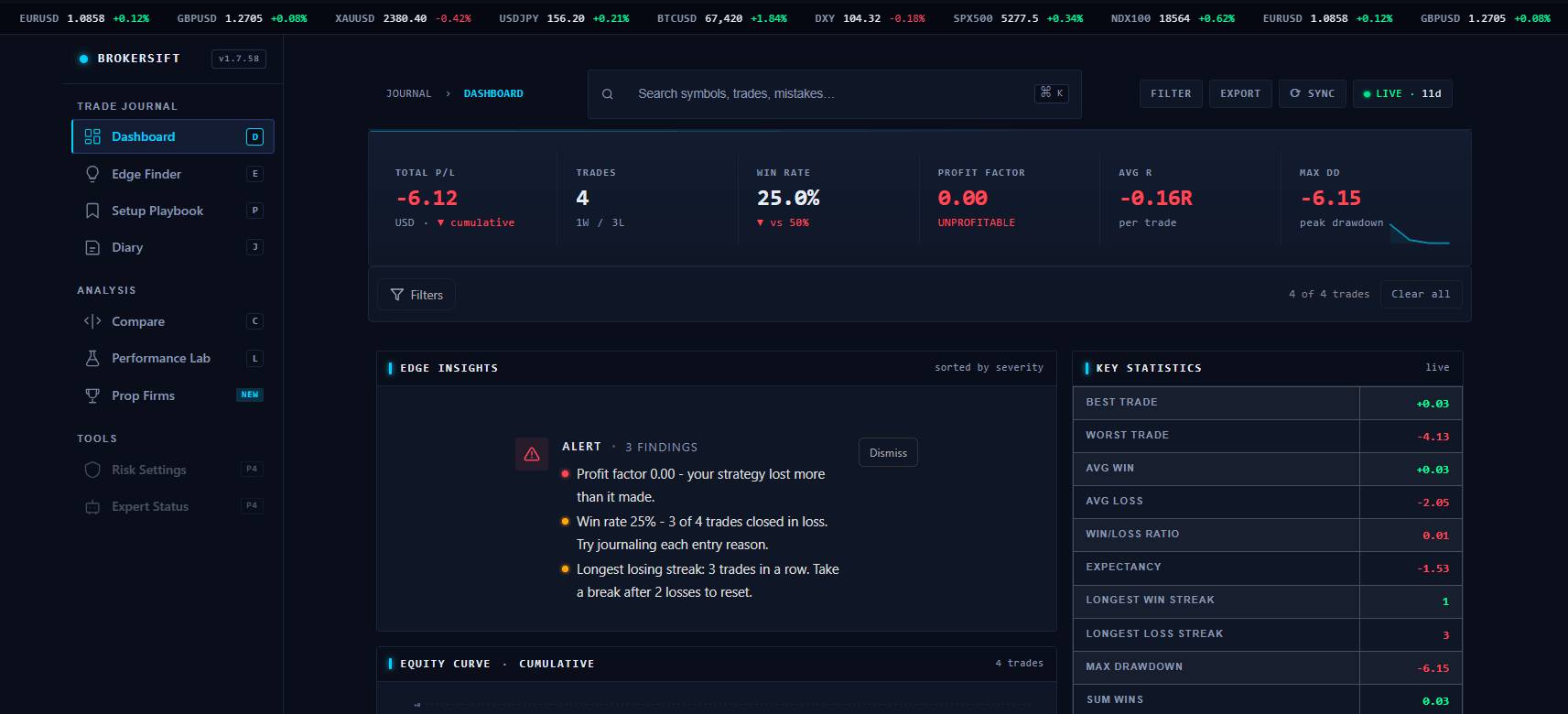
Trading journal dashboard preview
Profit factor1.24Session-aware performance
Win rate56%See quality beyond raw P&L
Rule cost$320Measure discipline leakage
Automatic MetaTrader journal

Why MT4 and MT5 Traders Need an Automatic Trading Journal

Most traders fail not because their strategy is wrong, but because they cannot see what is actually working. They remember their wins, forget their losses, and repeat the same mistakes for years. A trading journal changes that. It turns your trading from a feeling into a measurable process you can improve week over week.

The problem with traditional trading journals is friction. Logging every trade into a spreadsheet sounds simple until you have to record entry prices, exit prices, lot sizes, commission, swap, and screenshots after every session. Most traders quit within a week. The spreadsheet becomes a graveyard of half-filled rows, and the habit dies.

The BrokerSift Trading Journal solves this by connecting directly to MetaTrader 4 or MetaTrader 5. Every closed trade is captured automatically, including the chart screenshot at the exact moment of close. You do not type a single number. You just trade. The journal builds itself in the background, and your data is ready whenever you want to review it.
The Best Free Trading Journal for Forex Traders in 2026

Most "free" trading journals are either heavily limited free tiers of paid SaaS products (capped at 30 trades per day or one account), or generic spreadsheet templates that require you to type every trade by hand. Neither is truly free in the way most forex traders need: unlimited trades, automatic capture from MetaTrader, and access to the professional metrics that matter.

BrokerSift Trading Journal is built for forex and CFD traders who use MT4 or MT5. It is permanently free, has no trade caps, and includes profit factor, drawdown, equity curve, and four different performance breakdowns — features that competing platforms charge $20 to $80 per month for. The journal captures every closed deal automatically, so you spend zero time on data entry and all your time on analysis.

If you are a forex trader looking for a real journaling solution rather than a CSV importer or a paywalled trial, this is the one tool we recommend without reservation. Create a free account and you will be journaling your next trade within five minutes.

How Our Free MetaTrader Trading Journal Works (3-Step Setup)

A simple three-step setup connects MetaTrader to your BrokerSift dashboard and keeps your review workflow clean.

01

Install the Expert Advisor on Any MT4 or MT5 Chart

Download our lightweight Expert Advisor and drag it onto any chart in your MetaTrader terminal. Enter your free license key, and the EA starts capturing closed deals immediately. It works with any MT4 or MT5 broker — Exness, IC Markets, AvaTrade, IG Markets, FTMO, MyForexFunds, or any other.

02

Trade Normally — The Journal Captures Everything

Open and close trades exactly as you always do. The EA observes only closed deals and forwards them securely to your dashboard within 60 seconds. It does not place trades, modify orders, or read your strategy. Your trading is completely unaffected.

03

Review Your Performance With Real Metrics

Open your dashboard anytime to see every trade, your equity curve, daily heatmap, and the professional metrics most retail traders never calculate. Add notes to specific trades, spot losing patterns, and refine your strategy with data instead of memory.

Live dashboard widgets

See what’s really driving your wins, losses, and consistency; in real time.

Transform raw MT4 and MT5 trade history into live behavioral insights, execution patterns, performance signals, and structured review systems built for serious traders.

Rule breaks detected 14 Clustered by setup, session and emotional state.
Best setup quality A+ A clean visual signal for what deserves more focus.
Next mission 1 rule Every review ends with one action for the next session.
Context engineEvery trade gets a story

Reason, setup, screenshot and psychology are visually connected.

Review enginePatterns become obvious

The landing shows how behavior and numbers become readable signals.

Action engineInsight turns into focus

Each review ends with one clean next action for the trader.

How Our Free MetaTrader Trading Journal Works (3-Step Setup)

Get your journal connected, synced, and fully tracking your trades in just a few minutes — no manual logging, spreadsheets, or technical setup required.

01

Install the Expert Advisor on Any MT4 or MT5 Chart

Download our lightweight Expert Advisor and drag it onto any chart in your MetaTrader terminal. Enter your free license key, and the EA starts capturing closed deals immediately. It works with any MT4 or MT5 broker — Exness, IC Markets, AvaTrade, IG Markets, FTMO, MyForexFunds, or any other.

02

Trade Normally — The Journal Captures Everything

Open and close trades exactly as you always do. The EA observes only closed deals and forwards them securely to your dashboard within 60 seconds. It does not place trades, modify orders, or read your strategy. Your trading is completely unaffected.

03

Review Your Performance With Real Metrics

Open your dashboard anytime to see every trade, your equity curve, daily heatmap, and the professional metrics most retail traders never calculate. Add notes to specific trades, spot losing patterns, and refine your strategy with data instead of memory.

JOURNAL FEATURES

Turn raw MT4 and MT5 trade data into a structured performance system built for serious traders.

Track every trade automatically, review professional metrics, and understand what is really driving your trading results.

01

Automatic Trade Capture

Every closed trade is synced within 60 seconds with entry price, exit price, lot size, commission, swap, and full P/L data.

02

Chart Screenshots & Context

The journal captures a chart screenshot at the exact moment of close so every trade keeps its full visual context.

03

Professional Performance Metrics

Track win rate, profit factor, drawdown, average R-multiple, best trade, worst trade, and trading streaks automatically.

04

Visual Analytics & Heatmaps

Review equity curves, daily P/L heatmaps, and performance breakdowns by symbol, day, and trading session.

Interactive Walkthrough

Explore Your Trade Data Like a Real Product

This section lets traders explore how the journal actually improves performance; from reviewing trades and spotting patterns to refining discipline and building a repeatable edge. Designed to feel interactive, practical, and data-driven instead of another generic dashboard demo.

Performance

Performance Intelligence

Separate profitable execution from emotional noise using real trade data.

1.42Expectancy score+18% vs prior month
week 1week 2week 3week 4
Find which setups actually produce edge
Reveal hidden drawdown patterns by session
See where execution destroys expectancy
BEHAVIORAL INSIGHTSSESSION ANALYTICSEDGE DETECTION
Journal intelligence studio

Journal Intelligence Preview

Journal edge score

Adjust the trader inputs and let the landing demonstrate how the journal turns behavior into a clear improvement signal.

72Journal score
Sharp process

Your current profile shows a strong foundation. The next lift comes from better exit review and tighter emotional control during lower-quality sessions.

Next action

Reduce lower-quality trades and review exit management before increasing size.

Risk posture

Balanced. Keep risk consistent while the playbook gets cleaner.

Execution pressure63
Process stability78
Best-session signal71

Command center preview

A high-end landing should feel like a product. This preview combines radar and mode cards in a cleaner dashboard layout without depending on external libraries.

01
Edge mapShows which setups deserve attention, size, and protection.
02
Risk radarHighlights drawdown habits, over-risking, and late-session mistakes.
03
Emotion lensConnects emotional state to entry quality, exit quality, and rule breaks.
04
Action planConverts the review into one measurable behavior for the next session.

Smart trade replay

Reconstruct a trade with screenshots, notes, tags, emotions, and rule quality in one visual story.

Leak detector

Show which behavior costs the most: early exits, oversizing, boredom trades, or setup drift.

Weekly mission

Turn analytics into a clear focus item instead of leaving the trader with a wall of numbers.

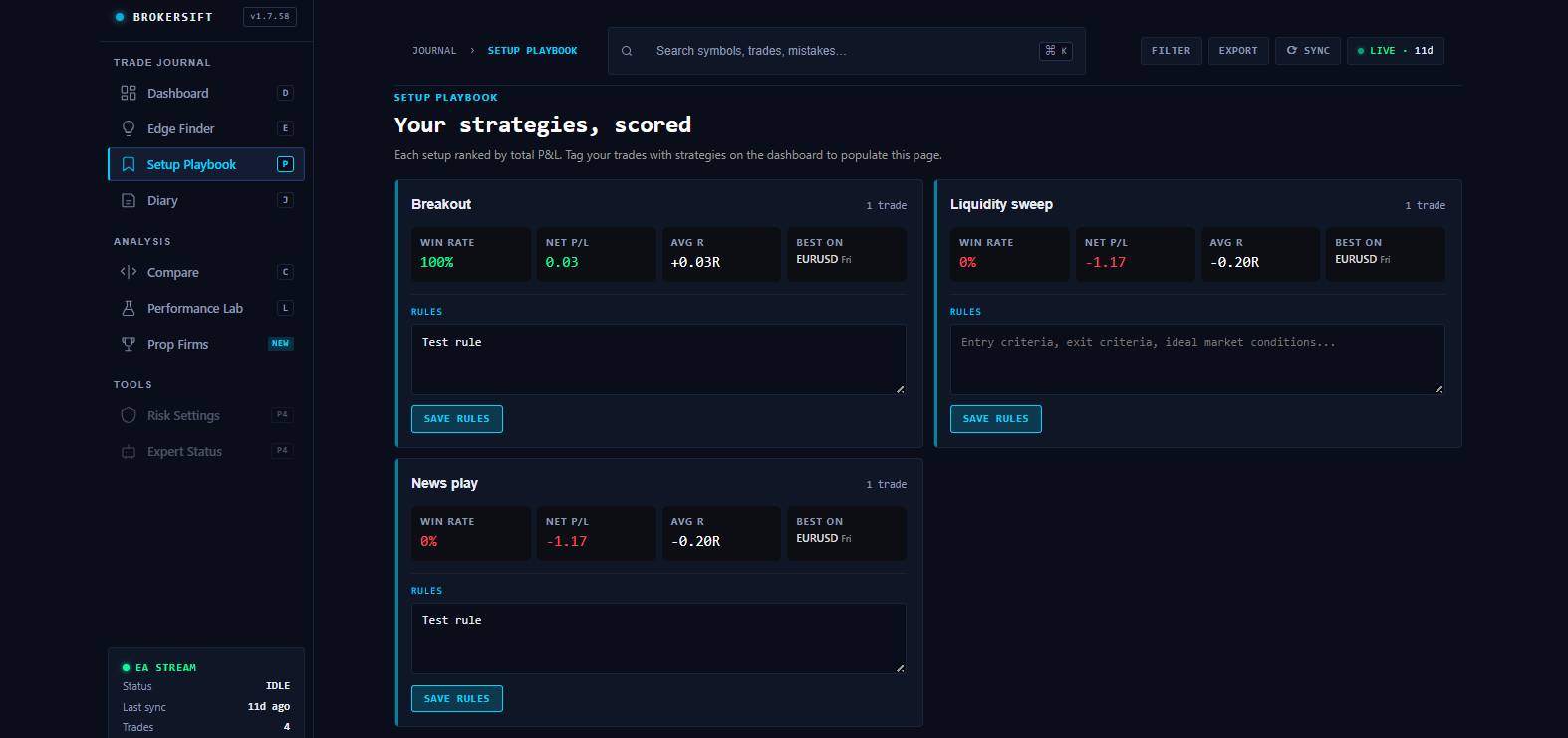
Setup library

Group the best repeatable patterns into a practical playbook that gets cleaner over time.

10 Professional Performance Metrics That Matter

Win rate alone is not enough. The BrokerSift Journal calculates the 10 metrics professional traders and prop firms care about most:

  1. 1Total Trades — with win/loss split.
  2. 2Win Rate — the percentage of trades that closed in profit.
  3. 3Total P/L With Sparkline — cumulative profit/loss with a mini-chart showing the trend.
  4. 4Average R-Multiple — how much you make or lose per unit of risk taken.
  5. 5Best Trade — your largest winning trade.
  6. 6Worst Trade — your largest losing trade.
  7. 7Profit Factor — the ratio of total profits to total losses. The single most important number when evaluating a strategy.
  8. 8Maximum Drawdown — the largest peak-to-trough drop in your equity curve. Critical for risk management and prop firm rules.
  9. 9Average Win vs Average Loss — how big your typical winner is compared to your typical loser, plus the ratio between them.
  10. 10Win/Loss Streaks — your longest consecutive winning and losing runs, because streaks are where most traders break psychologically.
Interactive Equity Curve Visualisation
See your cumulative profit and loss plotted as an interactive equity curve. Spot the moment a losing streak started. See whether you are in drawdown or breaking new highs. Identify the inflection points in your trading career that no spreadsheet would ever show you.
60-Day Daily P/L Heatmap
A calendar view showing which days were green and which were red across the last 60 days. Click any day to filter your trades to just that session. Find out instantly whether Mondays really are your worst day, or whether you trade better on certain weeks of the month.
Performance Breakdowns by Symbol, Day, Hour, and R-Multiple
The journal slices your trades four different ways so you can find your edge:
• By Symbol — which pairs you actually make money on, and which ones drain your account. With profit factor per symbol.
• By Day of Week — Monday vs Friday vs everything in between, visualised as horizontal bars.
• By Hour of Day — a 24-cell heatmap showing your best and worst trading hours in UTC.
• By R-Multiple — histogram of your trade outcomes in terms of risk units, so you can see where your distribution actually lives.
Notes and Chart Screenshots for Every Trade
Click any trade to open the detail modal. You will see the chart screenshot captured at close, the full P/L breakdown including commission and swap, the initial risk and resulting R-multiple, and a notes field where you can write what you were thinking when you took the trade. Lightbox view lets you zoom into any screenshot.
Filters, Sorting, and Cross-Filter From Calendar to Trades
Filter your trade history by symbol, time period, side (buy or sell), or result (winners or losers). Click any column header to sort. Cross-filter from the calendar to the trade table to drill into a specific day. Find any trade in seconds.
Live Auto-Refresh Every 60 Seconds
The dashboard refreshes itself every 60 seconds. Close a trade on your phone, and within a minute it appears in your journal with the screenshot attached. No reloading. No re-syncing. It just works.
Try All 10 Metrics Free
No credit card · Setup in 5 minutes
Persona simulator

Match the Journal to Your Trading Style

The simulator section adds another layer of interactivity: visitors can jump between trader profiles, see the screen change, and understand how the journal responds to different strategies and weaknesses.

Persona simulator

Journal operating system preview

Choose a trader profile to preview how review metrics, risk posture, and weekly focus areas can change across different trading styles.

Scalper

Fast-paced scalper

Small-spread, weaker patience, and only late-session behavior.

Current focus

Reduce impulse re-entries and tighten session cut-off rules.

Risk posture

Medium risk posture. Keep size capped until consistency stabilizes.

Hot insightSession discipline

Late-session trades are eroding process quality faster than strategy quality.

Progress matrix

These bars react to the active profile and the live score engine.

Execution quality68
Risk control72
Review depth76

Mistake heatmap

Click a cell to preview the kind of insight the journal can surface.

Revenge trade clusterHigh cost

The highest-cost cluster appears after a first loss and before the session is cut off.

Before / after review

See How Journaling Changes Your Review Process

Before journaling

Scattered notes, unclear lessons

Trades are remembered emotionally, screenshots are separated from context, and the same mistakes keep repeating without a measurable improvement path.

After review

Clean signals and one next action

The journal connects outcomes, discipline, market context and behavior into a clear improvement loop that the trader can repeat.

From memory to evidence

Stop relying on emotional recall and show the trade story with context, rules, screenshots and execution notes.

From P&L to process

Separate lucky wins from good decisions so the trader can improve the system, not just chase outcomes.

From scattered data to focus

Turn each review into a ranked set of leaks, strengths and one next-session mission.

From static page to product demo

The visitor interacts with the transformation instead of only reading a feature description.

Loop experience

What Traders Should Review Every Week

Click through each step of the review process and see how the journal helps turn random trades into smarter habits, clearer decisions, and consistent improvement over time.

Live review engine Capture Capture → Score → Review → Act → Compound
Adaptive review path

Save the trade story

Entry, exit, chart, reason, emotion, checklist and execution quality are stored as one connected record.

Stage
1 / 5
Current step Capture

The journal keeps this part of the workflow visible so the trader never loses context.

What it measures Trade context

This stage transforms raw activity into something structured and reviewable.

Main output Structured journal entry

The loop becomes practical because every stage produces a usable artifact.

Why it matters Less randomness

The trader moves from a raw experience to a cleaner decision system instead of repeating the same mistakes blindly.

Trading journal analytics preview
Analytics lab

Find the trades, times, and setups that drive your results

The analytics section is built for dashboards, report cards, trade breakdowns, and performance segmentation. Replace the preview image with your own product image later.

Time-of-day review

Spot when performance drops, where boredom trades appear, and which sessions produce cleaner execution.

Instrument breakdown

Separate your best symbols and markets from low-quality noise before adding more risk.

Exit performance

Compare actual exits against best potential outcomes to reveal early exits and poor trade management.

Psychology lab

Make discipline and emotions visible

Track the qualitative side of trading: confidence, stress, impulsive entries, checklist quality, rule breaks, and post-trade reflections.

Mistake library

Group repeated behavior leaks so the trader can see what costs the most money.

Checklist quality

Measure whether the trade followed the plan before judging only the profit or loss.

Diary and review

Keep session reflections beside the numbers so progress becomes visible over time.

Trading psychology journal preview
Built for MetaTrader 4 and MetaTrader 5 Workflows

Built for MetaTrader 4 and MetaTrader 5 Workflows

Track performance across Forex, Stocks, Crypto, Futures, CFDs, and Options; with support for both manual and platform-based workflows.

StocksForexFuturesCryptoOptionsCFDsMetaTraderTradingView

Who the journal helps most

01

New traders

Create structure before bad habits become normal.

02

Break-even traders

Find leaks in exits, timing, risk, and rule discipline.

03

Profitable traders

Optimize the setups and sessions where the edge is strongest.

Find the Trades, Times, and Setups That Drive Your Results

Two layers of personalization stack on top of the trader modes:

Watchlist

Pick the specific currencies and symbols you actually trade. The calendar then hides everything else. If you only trade EURUSD and XAUUSD, you do not need to see kiwi GDP next Tuesday.

Alerts

For any event on your watchlist, enable a browser notification that fires X minutes before release. Granted permission once, the alert works even when the BrokerSift tab is in the background. In-site reminders run in parallel as a fallback.

The watchlist saves to your browser, so the same setup follows you across sessions on the same device. Sign in with a BrokerSift account to sync across devices.

What traders should review every week

01

Best and worst setups

Which strategies deserve more size, more patience, or removal?

02

Rule breaks

Which mistakes repeat and how much do they cost?

03

Session quality

Which hours, days, and conditions produce clean execution?

04

Next-week focus

What one measurable behavior should improve next?

How Traders Actually Use the BrokerSift Journal

Different traders use the BrokerSift Journal to improve consistency, track performance, manage risk, and uncover the patterns behind profitable trading.

1. New Traders Building a Strategy
New traders use the journal to discover which setups, symbols, and trading hours actually work. Performance breakdowns quickly reveal strengths, weaknesses, and impulsive trading patterns.
2. Intermediate Traders Finding Their Edge
Traders with inconsistent results use the journal to identify problems like poor risk-reward ratios, oversized losses, or low profit factor — turning vague frustration into measurable data.
3. Prop Firm Challenge Traders
Prop firm traders track drawdown, consistency, and profit targets in real time while keeping an independent record of every trade and screenshot outside the prop firm's dashboard.
4. EA & Algorithmic Traders
Algorithmic traders use the journal to compare EAs across accounts, monitor performance in different market conditions, and maintain long-term records beyond MetaTrader history.

Trading Journal Security: How We Protect Your Data

Your trading data is sensitive. Here is exactly how the BrokerSift Trading Journal handles it, what we collect, and what we never have access to.

What the EA Reads From Your Terminal

The BrokerSift Expert Advisor reads only closed deal records from your MetaTrader terminal — ticket number, symbol, entry/exit price, lot size, side, commission, swap, and profit. It also captures a chart screenshot at the moment of close. That is the entire data scope.

What the EA Cannot Do

The EA cannot place trades, modify orders, change stop losses, withdraw funds, or read your account password. MetaTrader's security model prevents Expert Advisors from accessing the account password under any circumstances. The EA is read-only by design.

How Data Is Transmitted

Trade data is sent from your terminal to our servers over HTTPS with TLS 1.2 or higher. Each request includes your license key for authentication, but no broker credentials, no account password, and no personal identification.

Where Data Is Stored

Your trade history is stored on encrypted servers in a private database. Only you can see your own trades when logged into your BrokerSift account. We do not share, sell, or publish your trading data.

Your Rights and Privacy Policy

You can export all your trades to CSV at any time. You can permanently delete your account and all associated data from your settings. We comply with GDPR and similar privacy regulations.

Account Access & Broker Independence

The BrokerSift Trading Journal works independently from your broker account and does not require broker API access, payment details, or login credentials. Your trading account remains fully under your control at all times.

Who This Free Trading Journal Is For: Beginners to Funded Traders

This journal is designed to stay useful from your first months in forex all the way to funded and multi-account workflows.

New Forex and CFD Traders Learning What Works

If you have been trading for less than a year, you are in the most critical phase of your career. A journal is the difference between learning from your mistakes and repeating them for the next five years. Our journal removes the friction of manual logging so you can focus on learning, not data entry.

Intermediate Traders Looking for Their Statistical Edge

You have a strategy and you know your setups. But your equity curve is still flat or slowly bleeding. The BrokerSift Journal will show you exactly where your money is going. Maybe you are profitable on EURUSD but giving it all back on GBPJPY. Maybe Tuesdays kill you. Without data, you are guessing. With this journal, you know.

Funded Account and Prop Firm Traders

If you trade a funded account through FTMO, MyForexFunds, The5%ers, or another prop firm, drawdown is everything. The journal tracks your maximum drawdown in real time, calculates your profit factor against the firm's targets, and gives you a permanent independent record of your performance.

Algorithmic and Expert Advisor Traders

Running an EA? The journal captures every trade automatically, so you can evaluate your strategy without relying solely on MetaTrader's built-in reports. Compare different EAs side by side. See which ones perform under different market conditions.

Trading journal FAQ

Is the BrokerSift Trading Journal really free?

Yes. The BrokerSift Trading Journal is free to use. You can track trades, review metrics, export history, and analyze performance without a paid upgrade.

Does the journal work with both MT4 and MT5?

Yes. The journal is designed for MetaTrader 4 and MetaTrader 5 workflows through the BrokerQueue Expert Advisor and the BrokerSift dashboard.

How does the journal capture my trades automatically?

The Expert Advisor reads closed trade data from your MetaTrader terminal and sends the trade details to your BrokerSift account through a secure API connection.

What performance metrics does the journal track?

The journal tracks win rate, profit factor, expectancy, average win and loss, maximum drawdown, equity curve, symbol breakdowns, time-based behavior, and tagged trade performance.

Can I tag trades for filtering and analysis?

Yes. You can tag trades by setup, session, strategy, emotion, mistake type, or any custom label you use in your review process.

Can I export my trade history to a spreadsheet?

Yes. Trade history can be exported for spreadsheet analysis, reporting, and offline review.

Is my trade data private and secure?

Your trade data is stored inside your BrokerSift account and is not published publicly. The EA does not need your broker password or account credentials.

Can I edit or delete trades after they are captured?

The journal is designed around data integrity. Captured trades are treated as an audit trail so performance metrics remain honest and useful.

Do I need a specific broker to use the BrokerSift Trading Journal?

No. It can work with any broker that supports MetaTrader 4 or MetaTrader 5.

How is BrokerSift Trading Journal different from paid journals?

BrokerSift focuses on free automatic capture, core performance metrics, tag-based review, and a tamper-resistant workflow instead of expensive manual journal features.

Build the journal habit

Start Reviewing Your Trades With Real Data

Create a free BrokerSift account, connect your MetaTrader workflow, and start reviewing trades with metrics that make mistakes and strengths visible.

About the author

Olivia Carter

Risk Management & EA Lead at BrokerSift

Olivia leads BrokerSift’s quantitative tools team. She works on BrokerQueue, MetaTrader automation, journal analytics, risk modeling, and behavior-focused trading review workflows.

MQL4 / MQL5Risk ModelingAlgo TradingTrading Journal Systems
Editorial review: This page was reviewed for technical accuracy of MetaTrader integration claims and trading journal metric definitions. Ethan Walker, BrokerSift’s Forex & Broker Analyst.
01

Free Tool Disclosure

BrokerSift Trading Journal is offered free of charge as a value-add for traders. A free BrokerSift account may be required to save trade data across devices.

02

Data Integrity Notice

Captured trade records are designed to support honest review and performance tracking. The goal is to reduce bias-driven edits and preserve a useful audit trail.

03

Affiliate Disclosure

BrokerSift may participate in affiliate or introducing broker programs. These partnerships do not change the Trading Journal product features or the way metrics are calculated.

04

Risk Disclosure

Forex, CFDs, and crypto trading involve substantial risk. The BrokerSift Trading Journal is an analytics tool and does not provide trading signals, investment advice, or guaranteed results.

Need help choosing a broker?Compare trusted platforms and start with the right option.
Start now