MetaTrader 4 & 5 expert advisor · 100% free
The free MT4 & MT5 expert that sizes and manages every trade for you
BrokerSift Expert is a free money management expert advisor for MetaTrader 4 and 5. Choose your risk, drag the stop and target on the chart and it calculates the exact lot size, places the order in one click, then takes you to a real break-even, closes partials and journals the trade — with our signals right inside the terminal.
MetaTrader 4 · MetaTrader 5 · Any broker · Windows, and macOS or Linux through Wine
Risk per trade
1.0%
Balance
$10,000
Stop distance
1.80
Lot size
0.55
Candle closes in
00:42
- 2
- platforms: MT4 and MT5
- 3
- ways to size: %, money or lots
- 1
- click to a real break-even
- $0
- licence fee, subscription or card
The problems you feel in every trade
Sound familiar? Each of these is a sizing or discipline problem, and each has a fix in the expert.
Emotional entries
Chasing a move with an unplanned order — the expert trades from lines you placed and checked in advance.
Wrong lot size
A “round” volume that risks 8% instead of 1% — the size is computed from the stop distance every time.
Break-even that still loses
A stop moved to the entry price still loses the spread and commission — the expert’s break-even includes both.
Manual arithmetic
Pip values, contract sizes and currency conversion — done for you, correct for every symbol your broker lists.
A tour of the panel
One compact panel on your chart, in three parts. These are screens from the MetaTrader 5 build; the MetaTrader 4 build looks and works the same.

Trade: size first, then place
Pick the unit — percent of balance, money in your account currency or fixed lots — and the value. Press BUY or SELL and the entry, stop and target lines appear on the chart, already sized.
- Drag the stop and target; the lot size and risk update as you move them
- Every line is labelled with pips, money and percent at risk, lots and reward-to-risk
- PENDING picks buy/sell limit or stop from where you put the entry
- PLACE sends exactly what is on the chart; Cancel removes the lines

Signals: the channel inside MetaTrader
Today’s signals are listed in the terminal with their entry, stop, target and status. Click one and its risk and reward zones are drawn on the chart before you decide anything.
- A live check against your own broker: your quote, deviation, spread and lot size
- A clear ACCEPTED, or the exact reason a signal would be rejected
- Pop-up and sound alerts the moment a new signal is posted
- A 30-day history line: signals, targets, stops and win rate

Positions and tools: manage in one click
Every open position gets its own row with the floating result and the buttons that matter while a trade is running. The footer holds the chart tools.
- BE, RF, 50%, 25% and close buttons on every position
- Net result of all open positions in money or percent
- Trading-session boxes, candle timer, auto-trade and alerts toggles
- Every setting and the panel’s position are remembered
Every feature, explained
Most losses come from bad sizing and emotional entries, not bad analysis. Everything below is built to remove both.
Automatic lot size
Risk a percentage of your balance, a fixed amount of money or a fixed lot. The lot size comes from the stop distance and the symbol’s tick value, rounded to your broker’s lot step.
Orders from chart lines
Draw the trade instead of typing it: entry, stop and target lines you drag into place, then one click on PLACE. What you see on the chart is what is sent.
Market and pending orders
Market orders follow the price; pending orders sit exactly where you put the entry, and the expert chooses limit or stop from where that is relative to the market.
Real break-even
The BE button moves the stop to the open price plus the spread plus the round-trip commission, so a trade taken to break-even really cannot lose.
Risk-free in one click
RF closes just enough of the position that, if the rest is stopped out, the whole trade ends at zero. The remainder runs to target with nothing at stake.
Partial closes
Close 50%, 25% or any percentage you set of a position with one button, rounded to your broker’s lot step. The target moves on to the next level afterwards.
Multi-target ladder
A signal with several take-profits is executed as a ladder: partial closes at each target, an optional move to break-even at the target you choose, and optional trailing.
Signals inside MetaTrader
Our analysts’ gold and major-pair signals appear on the panel with entry, stop and targets, and can be drawn on the chart, taken with one click or executed automatically.
Checked against your broker
Before any signal is traded it is tested against your own quote: entry deviation, spread, stop distance, market hours and free margin. It waits or is refused, with the reason.
Works with every symbol name
GOLD, XAUUSDm, XAUUSD.pro, #US30 — built-in aliases and a suffix scan find your broker’s symbol, and you can add your own mappings.
Practise on demo, auto-trade when you choose
The expert places real orders on whatever account it runs on, so start on a demo account to practise. Auto-trade stays off until you turn it on.
Your own risk limits
Set the allowed directions and symbols, trading hours, a maximum number of open trades and a maximum daily loss. Anything outside them is refused.
Automatic trade journal
Every trade on the account — from a signal or by hand — is recorded with prices, stop, lots, costs and result, plus a private chart picture at the open and at the close.
Trading sessions on the chart
Tokyo, London and New York session boxes are drawn on the chart for each day, so you always know which market is driving the price.
Candle timer
A live countdown to the close of the current candle, right next to it, so entries and exits land exactly where your strategy expects them.
Made to stay out of your way
Dark or light theme, custom line colours, a panel you can drag, lock or minimise, and every toggle remembered across timeframe and symbol changes.
Safe by default
An expert that touches your account should be predictable. These rules are built in and cannot be switched off by accident.
- Auto-trade starts off; practise on a demo account first
- Never shifts a signal’s entry, stop or target to fit your broker
- Never takes the same signal twice, even after a restart
- Refuses a trade with a written reason instead of guessing
- Stops only move when you asked for break-even or trailing
- Keeps reports queued while offline and sends them later
Choose your platform
One source, two builds: the panel, the signals and the journal work the same on both.
MetaTrader 5
Version 2.46
- Automatic lot size by %, money or lots
- Market and pending orders from chart lines
- Real break-even, risk-free and partial closes
- Signals, auto-trade and demo practice
- Journal with every exit of a partly closed trade
MetaTrader 4
Version 2.46
- Automatic lot size by %, money or lots
- Market and pending orders from chart lines
- Real break-even, risk-free and partial closes
- Signals, auto-trade and demo practice
- Partial closes followed across MT4’s ticket changes
What you need
- MetaTrader 5 (any recent build) or MetaTrader 4 (build 600 or later)
- An account with any broker — demo or real
- Windows, or macOS and Linux through Wine or CrossOver
- Internet access to brokersift.com for signals and the journal
Sign in with Google and your dashboard gives you the build for your platform, with the setup guide. The manual panel works even before you connect it.
Install it in five minutes
No installer, no VPS and no extra software — the expert runs inside the MetaTrader terminal you already use.
Download it free
Sign in with Google and download the .ex5 (MetaTrader 5) or .ex4 (MetaTrader 4) file from your dashboard. No licence key, no card.
Allow brokersift.com
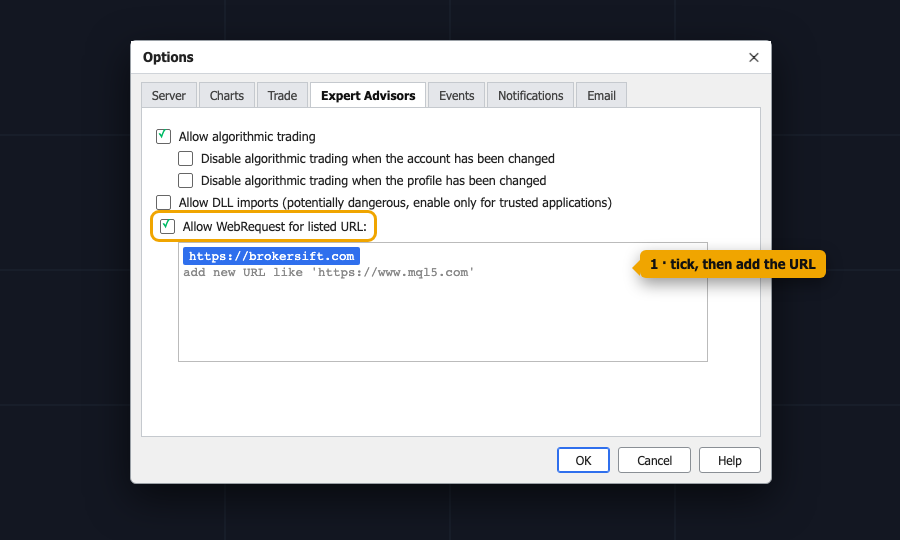
In MetaTrader open Tools → Options → Expert Advisors, tick “Allow WebRequest for listed URL” and add https://brokersift.com and https://hub.brokersift.com. Only needed for signals and the journal.
Copy it and drag it onto a chart
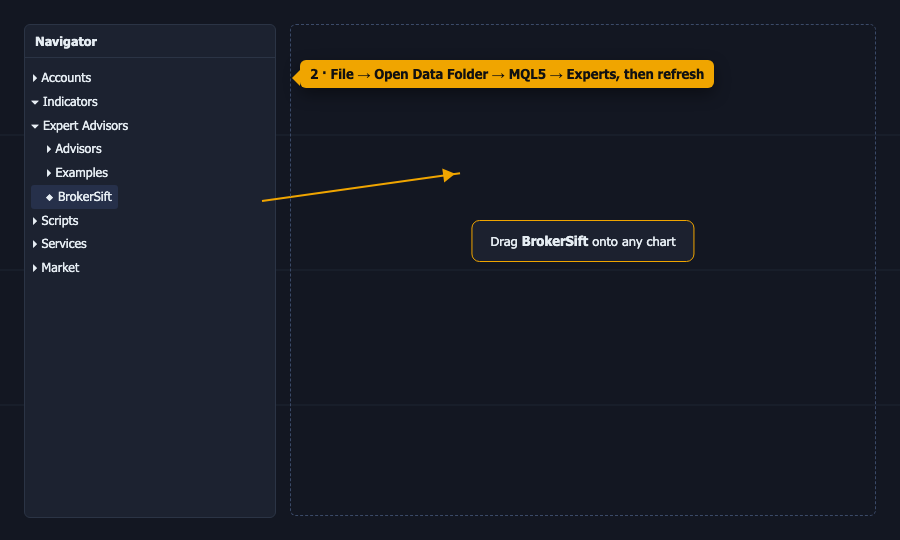
File → Open Data Folder → MQL5 (or MQL4) → Experts, paste the file, refresh the Navigator and drag BrokerSift onto any chart. Tick Allow Algo Trading.
Connect with a six-digit code
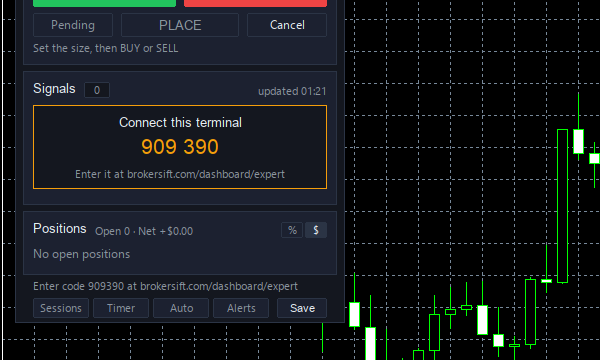
Press “Generate connect code” on your dashboard and type the code into the panel’s Signals tab. Nothing to copy or paste, and each terminal gets its own key.
Set your risk and trade
Choose your risk once. From then on every order you place from the panel is sized correctly — start on a demo account until the flow feels natural.
Better together
The expert is one part of a free toolkit. Watch the live session, follow the signal, and let the expert size and manage the trade.
Free forex signals
Gold and major-pair signals with entry, stop loss and six targets, delivered to your dashboard.
Learn moreLive trading sessions
Watch a professional trader analyse, enter and manage real trades on Zoom every trading day.
Learn moreTrading journal
Every trade on your account recorded automatically, with monthly statistics and your own notes.
Learn moreTrading calculators
Position size, pip value, margin, risk-reward and more — free, in your browser.
Learn moreBroker reviews
No broker yet? Compare regulated forex brokers before you open an account.
Learn moreEconomic calendar
Check the day’s high-impact releases before you act on any signal.
Learn more
Frequently asked questions
Is the BrokerSift Expert really free?
Yes. There is no licence fee, no subscription and no card. Sign in with Google, download the build for your platform from the dashboard.
Which platforms and brokers does it support?
MetaTrader 4 and MetaTrader 5, with any broker, on demo and real accounts. It runs inside your existing terminal and needs no bridge or extra software.
How does it calculate the lot size?
From your chosen risk (a percentage of balance, an amount of money or a fixed lot), the distance between entry and stop loss, and the symbol’s tick value and contract size reported by your broker. It rounds to the broker’s lot step and respects its minimum and maximum volume.
What is the difference between break-even and risk-free?
Break-even (BE) moves the stop to the open price plus spread and commission, so the trade cannot lose. Risk-free (RF) instead closes just enough of the position that the rest can be stopped out at zero — you bank part of the profit and let the remainder run.
Does the expert trade automatically?
Only if you ask it to. Auto-trade starts off, so every order is placed by you from the panel. Turn auto-trade on and it executes signals for you, inside the limits you set.
Will it change my signal’s prices to fit my broker?
No. The entry, stop and targets are never shifted — only rounded to your symbol’s digits. If your quote is too far from the entry or the spread is too wide, the signal waits, and after its expiry it is refused with the reason.
Can I use it without connecting to BrokerSift?
Yes. Lot sizing, chart-line orders, break-even, risk-free, partial closes, sessions and the candle timer all work on their own. Connecting adds the signal feed, auto-trade and the automatic journal.
Does it work on a demo account?
Yes, and that is where we recommend you start. Run it on a demo account until the line-based order flow feels natural, then move to your live account.
Do I need a VPS?
No. The expert works while your terminal is open. If you want auto-trade to run around the clock, a VPS simply keeps the terminal on.
Can I use it on several accounts?
Yes. Install it in as many terminals as you like; each one connects with its own code and appears on your dashboard, where you can disconnect it at any time.
What does the expert send to brokersift.com?
Only what its features need: requests for signals and status, an hourly heartbeat with the account number, broker, balance and platform, the result of each signal it evaluates, and your trades and chart pictures for the private journal.
How do I update it?
New versions appear on your dashboard. Download the new file, replace it in the Experts folder and reattach it to the chart — your connection and settings are kept.
Why money management decides who survives in forex
Two traders can take the same entries and end the year in opposite places. The difference is rarely the analysis. It is how much they risked on each trade, whether they honoured the stop loss and whether they let one bad day become a bad month.
Professional risk management is simple in theory: risk a fixed, small percentage per trade, define the stop before the entry, and take profits according to a plan. It is hard in practice because it needs arithmetic and discipline at the exact moment emotions run highest. A money management expert advisor moves both into the software.
That is what BrokerSift Expert does inside MetaTrader. Because the lot size is always derived from your risk and the stop distance, a wide stop automatically means a smaller position and a tight stop a larger one — the money at risk stays the same. Break-even, risk-free and partial closes are one click each, so managing a winning trade no longer depends on your nerve.
Use the expert together with the free forex signals: the signal supplies the entry, stop and targets; the expert checks them against your broker, converts them into the right lot size for your account and manages the position to plan. Every trade then lands in your trading journal with a picture of the chart, so you can see what actually works.
Educational content only, not investment advice. Trading forex, CFDs and crypto involves a high risk of losing money. Never risk capital you cannot afford to lose.